CAT surge readiness: a contractor payment plan for independent adjuster networks
Prepare roster readiness, fee schedules, internal approval capacity, funding, and closeout for catastrophe-driven adjuster volume.
Forecast the internal team capacity required for contractor onboarding, payment exceptions, support, and tax readiness across normal, peak, and growth scenarios.
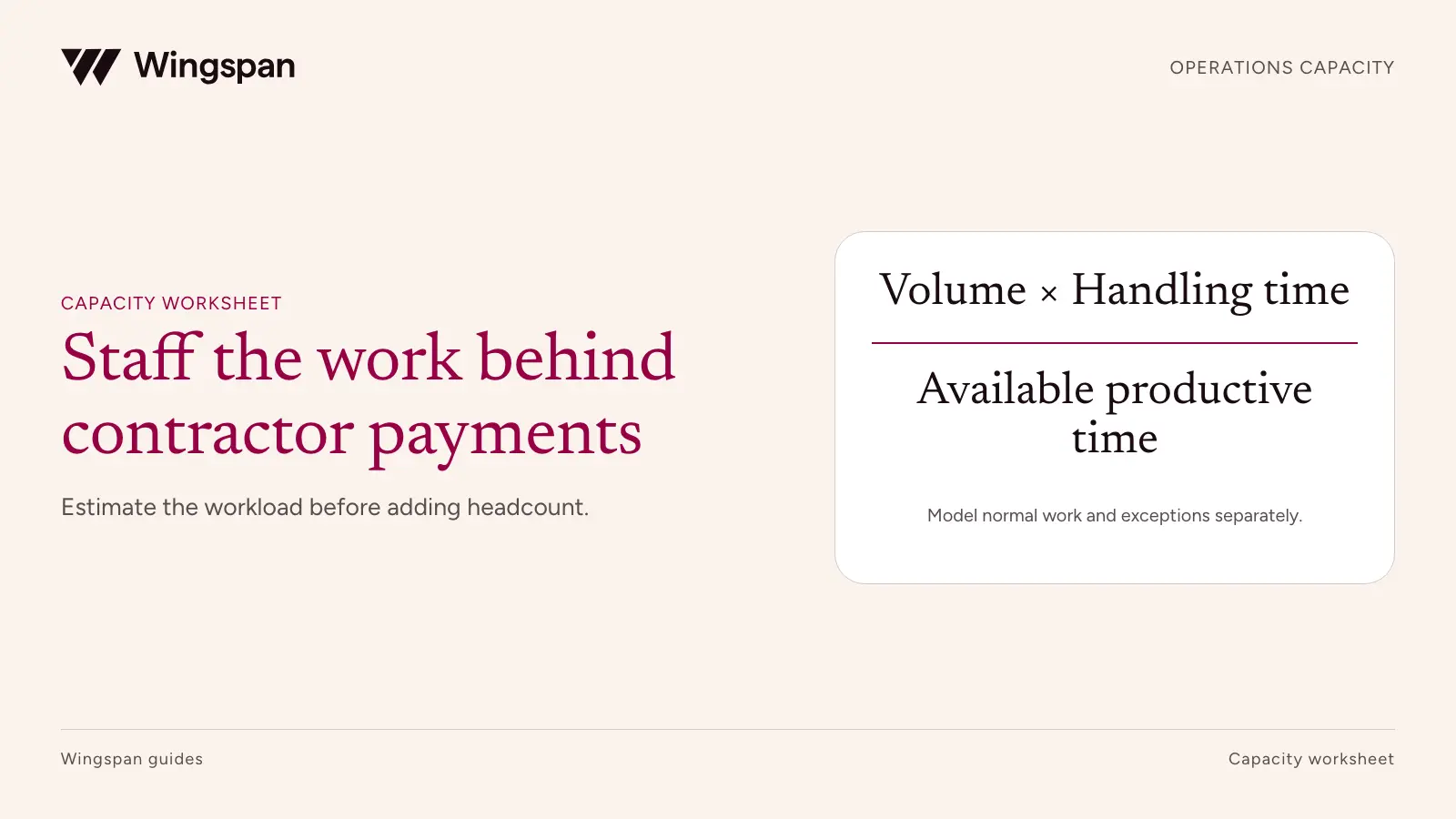
Staff contractor operations from the work arriving in each queue, the time needed to resolve it, and the coverage your service commitments require. A roster count alone can't tell you how many employees you need. Two networks with 2,000 contractors can create very different workloads if one has stable recurring activity and the other adds hundreds of people each week.
The model below is for the company's internal finance and operations team. It covers onboarding reviews, payment exceptions, support, tax preparation, and other contractor administration. It doesn't determine how many contractors to recruit or how to classify workers.
Use the capacity template, normal, peak, and growth examples, and scenario summary. The worksheet instructions explain the calculations and the limits of the staffing estimates.
Choose a unit of work that ends in a meaningful resolution. An onboarding case could close when the required review is complete. A payment inquiry could close when the contractor receives an accurate answer or the issue moves to a separate investigation with a named owner.
Several emails about the same payment are usually one case with several touches. Counting each email as a new case while also including the time for all emails in average handling time doubles the workload. Conversely, a support ticket that contains two unrelated payment problems may need two linked cases.
Use a stable taxonomy for at least several complete payment cycles. Distinguish standard cases from exceptions that require specialist review. Record reopened cases explicitly, either as additional arrivals or as extra work within the original case. Apply one convention throughout the model.
Avoid using elapsed resolution time as handling time. A case waiting three days for a document may require only 20 minutes of active employee effort. Both measures matter, but they answer different questions.
For each queue, calculate:
Monthly workload hours = expected cases × average active handling minutes ÷ 60.
Then add recurring work that doesn't arrive as individual cases: payment-run checks, reconciliations, quality sampling, reporting, and coordination with other teams. Include backlog reduction as a separate workload line when it is part of the plan.
A small time study is more useful than a precise-looking assumption without evidence. Sample ordinary and difficult cases across people, regions, and payment cycles. Include follow-up work and documentation. Don't measure only the first response or the quickest employee.
Use a weighted average for capacity planning and inspect the long cases separately. A low average can conceal a handful of complex investigations that require a senior specialist. The overall hours forecast may be reasonable while the proposed skill mix is still wrong.
Start with paid hours for the planning period. Remove time not available to the modeled queues, such as leave, meetings, training, and other assigned work. Then decide how much of the remaining time to commit to predictable workload.
The illustrative model uses 160 paid hours per employee per month, with 40 hours unavailable for queue work. It plans against 100 of the remaining 120 hours. The extra 20 hours provide capacity for arrival variability and unexpected work.
These are assumptions, not an industry standard or a recommended utilization target. Replace them with your operating calendar. Don't subtract the same meeting or leave allowance twice, and don't assume an employee can sustain continuous case handling throughout every available minute.
| Time component | Illustrative hours per employee per month | Treatment |
|---|---|---|
| Paid time | 160 | Starting point |
| Leave, meetings, training, other assigned work | 40 | Excluded from queue availability |
| Available queue time | 120 | Paid time less exclusions |
| Capacity reserved for variability | 20 | Left outside planned case load |
| Planned workload capacity | 100 | Denominator for this example |
Dividing workload by planned capacity gives full-time-equivalent workload. It doesn't by itself provide a staffing schedule or guarantee a response time.
Consider a synthetic contractor network with four main queues. In a normal month it receives 600 onboarding reviews at 12 minutes each, 240 payment exceptions at 25 minutes, 500 support cases at eight minutes, and 100 tax-readiness cases at 20 minutes. Recurring operational work adds 80 hours.
| Work category | Normal month hours | Seasonal peak hours | Growth month hours |
|---|---|---|---|
| Onboarding reviews | 120.0 | 240.0 | 150.0 |
| Payment exceptions | 100.0 | 150.0 | 125.0 |
| Contractor support | 66.7 | 106.7 | 83.3 |
| Tax readiness | 33.3 | 66.7 | 41.7 |
| Recurring operational work | 80.0 | 90.0 | 85.0 |
| Total workload | 400.0 | 653.3 | 485.0 |
| Workload FTE at 100 hours each | 4.00 | 6.53 | 4.85 |
The peak assumes 1,200 onboarding reviews, 360 payment exceptions, 800 support cases, and 200 tax-readiness cases. The growth case increases normal case arrivals by 25% and recurring work to 85 hours. Handling times stay constant so the effect of volume is visible.
If these were the only constraints and all staff were interchangeable, the workload would round up to four, seven, and five people. That is a preliminary capacity result. Actual headcount depends on coverage, specialist availability, part-time capacity, and the rest of each person's job.
Keep the peak in its expected months. Multiplying a short seasonal surge by 12 overstates annual staffing needs. Removing it from the forecast can leave the team unable to meet obligations when it arrives.
Map arrival timing against your payment calendar. Four employees may have enough total monthly hours while still being unable to clear a Monday approval queue before a Tuesday release. A monthly average won't show that bottleneck.
Build a coverage view by day or smaller interval where necessary. Identify who can answer routine questions, who can investigate payment status, and who can authorize a decision. An approver and a preparer may need distinct permissions even when they work in the same team.
Use time-based targets for the actual services you promise, such as initial response or review completion. Don't infer that 85% utilization will meet a particular response target. Check historical arrival patterns, case age, and performance during busy intervals, then revise capacity or the service commitment.
For a temporary surge, compare trained cross-coverage, temporary capacity, and permanent hiring. Include training and supervision costs. A person who is available for 100 hours but qualified for only routine tasks can't replace 100 hours of specialist tax or payment investigation work.
A queue can meet new demand and still retain an old backlog. Suppose 120 open exception cases require an estimated 20 minutes each. Clearing them adds 40 hours. If the normal monthly plan already uses all 400 planned hours across four people, that cleanup requires additional capacity or an explicit change in other commitments.
State the planned clearance period and the age or risk of the work. A backlog of unanswered status questions and a backlog of unresolved tax notices deserve different scheduling and escalation decisions.
Keep the contractor management policy aligned with those assignments. Staffing can't fix a queue where no one is authorized to make the required decision.
Model automation at the case level. If a workflow removes data entry but creates a review step, include the review time. If simple support cases disappear, remaining cases may become harder and take longer. Reusing the old average handling time can exaggerate the benefit.
In the Omni Interactions customer story, Omni reports eliminating more than 64 administrative hours weekly and reducing support tickets by 50% after adopting Wingspan. The reported savings span several teams, so measure which queues and tasks account for savings in your own operation.
Run a pilot through several complete cycles, compare arrivals and handling time, and inspect reopened cases and contractor outcomes. Reduce the staffing forecast only when the work has actually disappeared or moved to a defined provider service.
Our payment workflow handles repeatable steps while your team sets payment rules and approvals. That gives growing networks a way to address recurring payment work while keeping decisions with the responsible team.
Bring one normal month, one peak month, and five representative exceptions to a Wingspan operations walkthrough. We can map those queues to the payment workflow and the people responsible for exceptions. Use that map to revise the capacity model before making the staffing decision.
Prepare roster readiness, fee schedules, internal approval capacity, funding, and closeout for catastrophe-driven adjuster volume.
A decision model for estimating contractor replacement resources and service capacity lost during a departure, with explicit demand and coverage assumptions.
A post-launch operating plan for identifying payment workarounds, measuring approved-route adherence, and improving recurring workflows over 30, 60, and 90 days.